
n8n vs Zapier vs Make: What a B2B Team Should Actually Use
n8n vs Zapier vs Make comes down to speed, cost and control. Here is how each one bills, what it really costs, and which fits your team.

n8n vs Zapier vs Make comes down to one trade: who carries the work. Zapier carries it for you, n8n hands it to your engineers, and Make sits in between. Choose on features alone and you can still end up with a bill nobody planned for, because each tool charges for something different.
This guide is for B2B teams picking a first automation platform, or reconsidering the one they already pay for.
Key takeaways
- Zapier bills per task, Make per credit, n8n per execution. At volume, that rule matters more than the plan price.
- Zapier is the fastest to start, Make is the best value for logic-heavy flows, and n8n gives the most control.
- n8n is the only one you can self-host, which means you own the patching too.
- Test one real workflow for two weeks before you pay for a year.
The short answer: Zapier for the fastest start, Make for the most value, n8n for the most control. Which one fits comes down to three questions:
- Who builds the workflows? A no-code team points to Zapier or Make. Engineers point to n8n.
- Where can customer data live? If it must stay on your own servers, n8n self-hosted is the only option of the three.
- How many runs and steps a month? High volume and long workflows favor Make or n8n.
How we researched this, and what we did not test
Here is what this comparison is built on:
- Each vendor’s own docs and pricing pages, all checked on 29 October
- Official help pages for every billing rule, because blog summaries disagree with each other
- Independent reviews, used only as a cross-check
And what I didn’t do:
- No benchmarks or load tests. The cost examples are arithmetic on published rules, not bills I measured.
- No trust in vendor-written comparisons. Zapier’s own comparison page and a sales-data vendor’s page both rank for this topic and both sell something, so I treat their claims about rivals as claims.
- No undated prices. Prices move often, so every one here carries a date.
Disclosure: Nevion Labs builds workflow automations on platforms that include Make and n8n. Factor that in, and check the sources yourself.
SOUND FAMILIAR?Still copying data between tools? We connect them and automate the handoffs.See Integrations →n8n vs Zapier vs Make: quick verdict
| If your team is… | Choose | Why |
|---|---|---|
| Marketing, sales ops or RevOps with no developer | Zapier | Fastest setup, 8,000+ apps, lowest learning curve |
| Ops-minded, comfortable with branching and data mapping | Make | Visual canvas, 10,000 credits from about $9/month on annual billing |
| Engineering-led, or bound by data-residency rules | n8n | Self-hosting, code nodes, billing per run instead of per step |
| Running high volumes or AI-agent workflows | Make or n8n | Both cost far less than Zapier as steps and runs grow |
How each tool counts usage: the rule that drives your bill
All three do the same basic job: something happens in one app, something else happens in another. What really separates them is what they charge for, and that matters more than the sticker price of any plan.
- Zapier bills tasks. A task is a successful action step. Per Zapier’s help center, triggers, filters, paths, Formatter, Delay, Looping, Tables and Forms steps do not use tasks, and neither do failed steps or editor test runs. Polling triggers use no tasks either. Once you pass your plan limit, pay-per-task plans are charged for extra tasks and other plans hold new runs until the cycle resets.
- Make bills credits. An operation is one module run, and credits are the billed unit. Make’s help center says existing operations were converted 1:1, third-party AI app modules still use one credit per operation, and Make’s own built-in AI features can use more because billing tracks actual AI cost. Loops multiply usage, since modules downstream of an iterator run once per item.
- n8n bills executions. An execution is one run of a workflow. Per n8n’s docs, only production executions count towards the quota. A Schedule Trigger counts every time it fires, polling nodes count only when they find new data, and each valid webhook request counts. Manual runs, sub-workflow runs and error-workflow runs do not.
Worked example: inbound lead routing
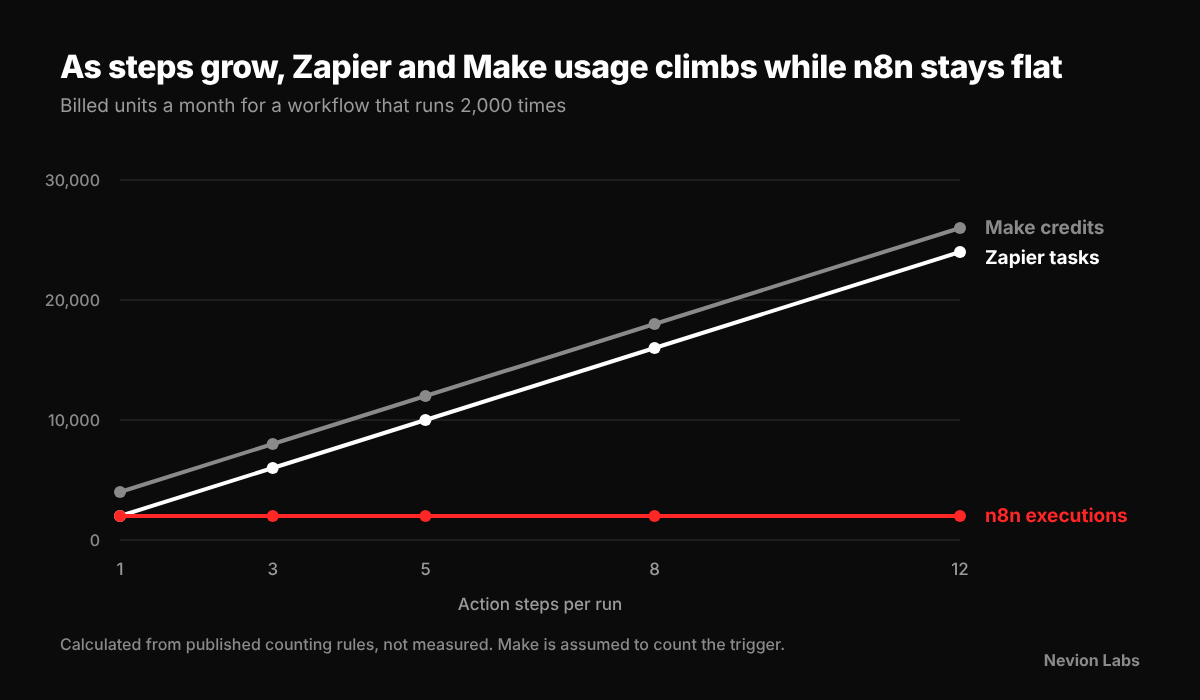
Take one workflow that runs 2,000 times a month. A new lead comes in, a filter checks it, then enrichment, scoring, a CRM record, a Slack alert and a spreadsheet log. That’s one trigger, one filter and five actions.
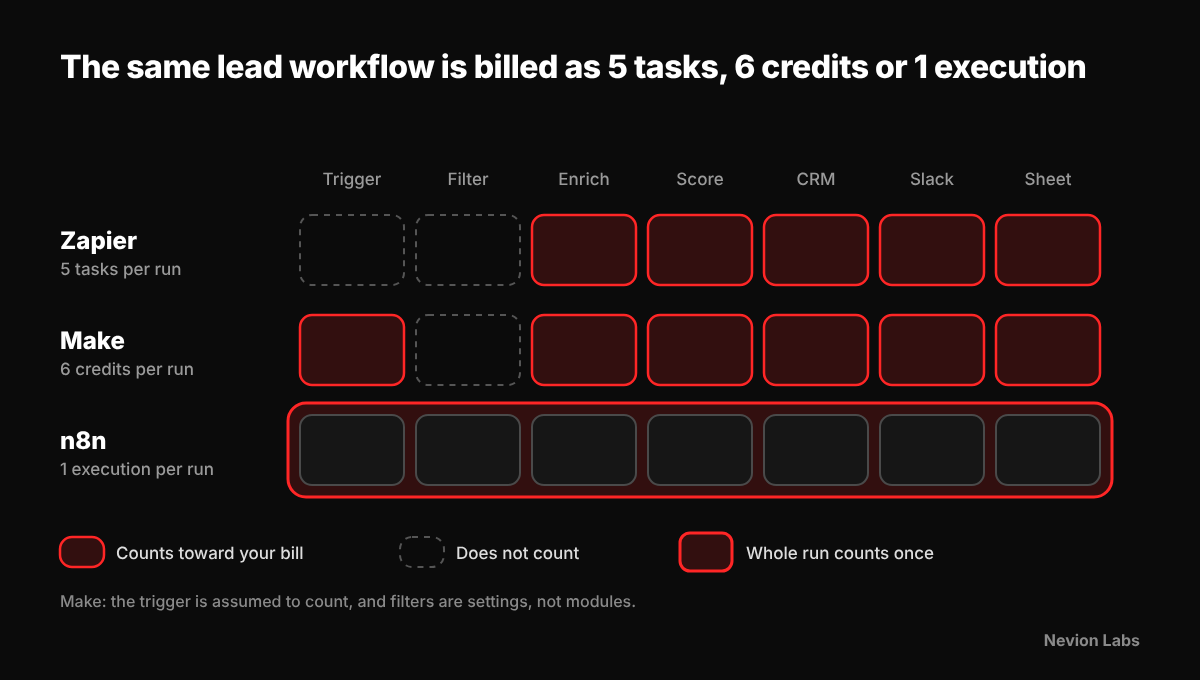
| Tool | What gets counted | Monthly usage | Plan that fits |
|---|---|---|---|
| Zapier | 5 action steps per run (trigger and filter are free) | 10,000 tasks | Above the 750-task entry plan; read the price off Zapier’s task slider |
| Make | 6 modules per run (assuming the trigger counts as one operation) | 12,000 credits | Core’s 10,000 credits plus one extra pack, roughly $18 on annual billing |
| n8n | 1 execution per run | 2,000 executions | Cloud Starter, about €20/month for 2,500 executions |
This is arithmetic on the rules above, not a measured bill, and add-on credit prices differ between sources, so check each pricing page. In the n8n vs Zapier cost comparison, what to remember is the pattern: every extra action step adds steps times runs to your Zapier and Make usage, and adds nothing on n8n.
Zapier: fastest to adopt, widest coverage
- Best for: non-technical teams that want results this week
- Builder: a straight list of steps; most people ship a first automation within an hour
- Apps: about 9,000 by Zapier’s own count, so niche SaaS tools are most likely covered here
- Logic: branching through Paths, plus Agents, Copilot and an MCP server that lets outside AI tools act across its apps
Pricing (October)
- Free: 100 tasks a month
- Professional: from $19.99/month billed annually ($29.99 monthly), 750 tasks
- Team: from $69/month annually ($103.50 monthly), 2,000 tasks, up to 25 users
- Enterprise: quoted
Watch for:
- Cost creep. Every successful action step is a task, so long workflows get pricey fast.
- No exit route. It is cloud-only, and independent reviews say you can’t export workflows.
Make: best value for logic-heavy workflows
- Best for: ops teams that think in flowcharts
- Builder: a visual canvas where modules are joined by lines, so you can see the data move
- Logic: routers for branching, iterators and aggregators for loops, error routes on each module
- Apps: 3,500+ by Make’s own claim
- Learning curve: days, not hours
Pricing (October)
- Free: 1,000 credits and 2 active scenarios
- Core, Pro, Teams: $9, $16 and $29 a month billed annually, each with 10,000 credits; they differ in features like full-text execution search and team permissions
- Enterprise: quoted; per Make’s pricing page it adds SSO, audit logs and overage protection
Watch for:
- Loops. Importing 100 rows costs at least 100 credits.
- AI features. Make’s built-in AI can burn more credits than a normal module.
- Cloud only. Like Zapier, there is no self-hosting.
n8n: most control, for teams that can run it
- Best for: engineering-led teams, or anyone with data-residency rules
- Builder: a visual canvas plus real code (JavaScript and Python nodes)
- Logic: an HTTP Request node for any API, sub-workflows, and an AI Agent node built on LangChain
- Version control: Git support on self-hosted setups
- Apps: roughly 400+ built-in nodes (counts differ by source, and Zapier’s comparison page claims more); the HTTP node and community nodes cover most gaps
Pricing (October)
- Community Edition: free to self-host, no execution cap
- Cloud Starter: about €20/month, 2,500 executions
- Cloud Pro: about €50/month, 10,000 executions
- Business: about €667/month billed annually, 40,000 executions, with SSO
- Enterprise: quoted
- Paid plans include unlimited users and workflows, so adding colleagues doesn’t raise the bill.
Watch for:
- Licence. n8n uses the Sustainable Use License: source-available, not open source in the OSI sense. Internal business use is fine; reselling it, embedding it in a product or hosting it for others needs a commercial agreement.
- Ops work. You own uptime, backups and patching, and SSO and audit-style features need a paid licence key even on your own server.
- Short history. One review notes Cloud Starter keeps only a day of execution history, so a Friday-night failure may be gone by Monday.
Security, compliance and governance
B2B buyers usually ask three things: who can see our data, where does it live, and can we prove who changed what.
Zapier reports SOC 2 Type II, SOC 3, GDPR and CCPA compliance. It says SAML SSO and role-based access come with the Team plan, while SCIM provisioning and app-level restrictions are Enterprise features. These are Zapier’s own statements.
Make reports GDPR, SOC 2 Type II and SOC 3 on its security page. Its pricing page lists SSO, audit logs and overage protection under Enterprise.
n8n is the only one of the three you can run on your own servers. That helps with finance, healthcare and contracts with data-residency clauses. But there’s a catch:
- CVE-2026-21877, rated CVSS 10.0, was disclosed in January.
- It let an authenticated user run untrusted code and potentially take over an instance.
- It hit versions from 0.123.0 up to, but not including, 1.121.3 (fixed in November), on both self-hosted installs and n8n Cloud, according to The Hacker News.
- More advisories were reported later.
The takeaway: self-hosting needs a patching routine, not just an install.
If you self-host n8n:
- Keep it off the public internet where you can
- Put it behind a reverse proxy or VPN
- Run it as a non-root user
- Subscribe to n8n’s GitHub security advisories
On any platform, ask the vendor for:
- Its SOC 2 report
- A data processing agreement
- The sub-processor list
- The data region and audit-log retention
And use OAuth connections instead of static API keys.
AI agents and data governance
All three now sell AI features. The question that matters for a B2B team is simple: where does your data go when an AI step runs?
- Zapier offers Agents, Copilot and an MCP server. Its help center says Agents use a separate activity quota, and each successful MCP tool call uses 2 tasks. Zapier says it provides AI guardrails for detecting personal data and prompt injection; that is a vendor claim we did not test.
- Make includes AI agents and AI modules, and its built-in AI features can use more credits than ordinary modules.
- n8n has an AI Agent node built on LangChain and can connect to models you host yourself, which keeps prompts and customer records inside your own infrastructure if your policy requires it.
Before you automate anything that touches customer data, settle three things: which fields may go to an outside model, who approves the actions an AI writes, and where the logs live.
n8n vs Zapier: side-by-side comparison
| Zapier | Make | n8n | |
|---|---|---|---|
| Builder | Linear steps | Visual canvas | Visual canvas plus code |
| App coverage | About 9,000 (vendor count) | 3,500+ (vendor claim) | 400+ built-in, plus HTTP node |
| Billing unit | Task per successful action | Credit per module run | Execution per workflow run |
| Entry paid price (annual) | $19.99/mo, 750 tasks | $9/mo, 10,000 credits | €20/mo, 2,500 executions |
| Self-hosting | No | No | Yes |
| Learning curve | Hours | Days | Days to weeks |
| SSO | Team plan (vendor claim) | Enterprise plan | Business plan and up, also on self-hosted licences |
| Compliance reported | SOC 2 Type II, SOC 3, GDPR, CCPA | SOC 2 Type II, SOC 3, GDPR | Your own controls if self-hosted |
| Workflow export | Not available | Yes (JSON blueprints) | Yes (JSON) |
Prices and plan details were checked in October. Confirm on each vendor’s pricing page before you budget.
Pricing at a glance (October)
| Tier | Zapier | Make | n8n |
|---|---|---|---|
| Free | 100 tasks a month | 1,000 credits, 2 active scenarios | Community Edition, self-hosted, no execution cap |
| Entry paid | Professional: $19.99/mo annual, 750 tasks | Core: $9/mo annual, 10,000 credits | Cloud Starter: about €20/mo, 2,500 executions |
| Team tier | Team: $69/mo annual, 2,000 tasks, up to 25 users | Pro $16 and Teams $29/mo annual, 10,000 credits each | Cloud Pro: about €50/mo, 10,000 executions |
| Business and above | Enterprise: quoted | Enterprise: quoted | Business: about €667/mo annual, 40,000 executions, SSO; Enterprise quoted |
Entry prices use annual billing where the vendor offers it. Confirm on each pricing page before you budget.
How to decide: four questions
- Who will build and maintain the workflows? If it is marketing or sales ops with no developer, start with Zapier or Make. If engineers own them, n8n becomes realistic.
- Where must the data live? If a contract or regulator requires your own infrastructure, n8n self-hosted is the only option of the three.
- How many runs and steps? Multiply runs by action steps using the counting rules above. Small, simple volumes suit any tool; long workflows at high volume favor n8n and Make.
- How complex is the logic? Branching, loops, custom code and AI agents favor Make or n8n. Simple trigger-and-action handoffs favor Zapier.
Plenty of B2B teams end up running two tools: Zapier for quick business-user automations, and Make or n8n for the heavier back-office and data work. That’s fine as long as every workflow has a named owner and a naming convention. Without those, it gets messy fast.
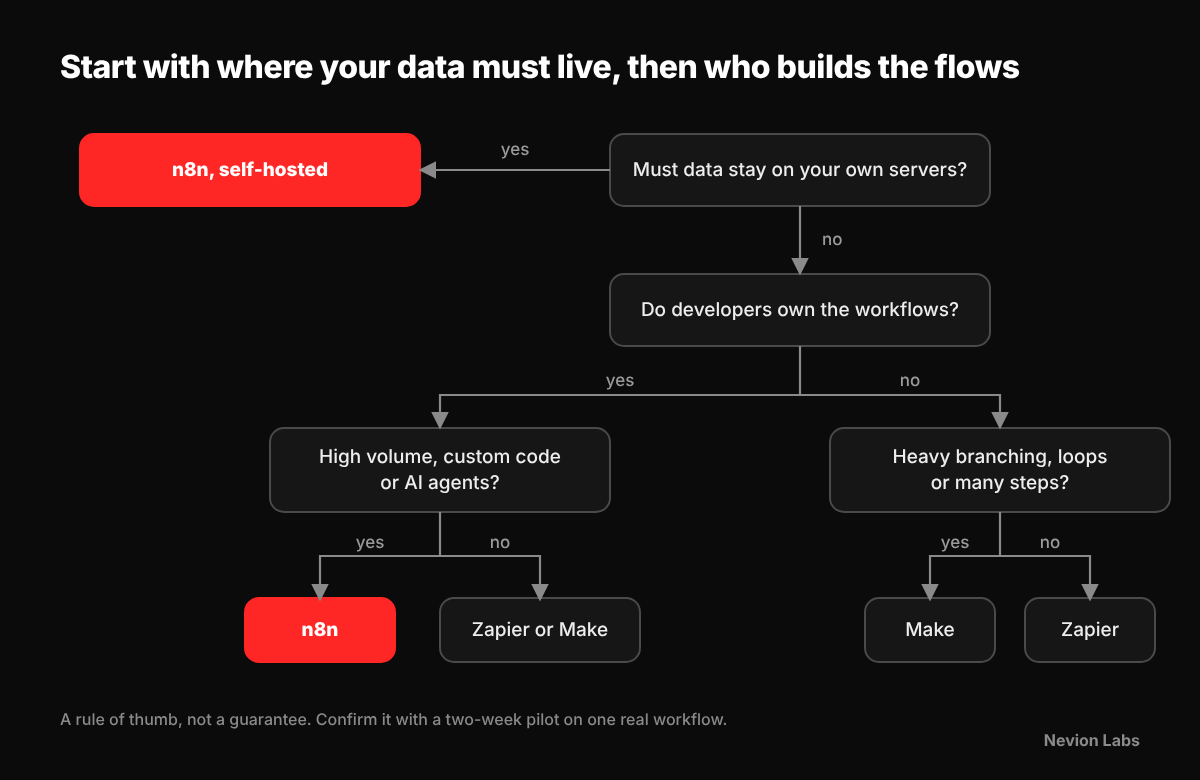
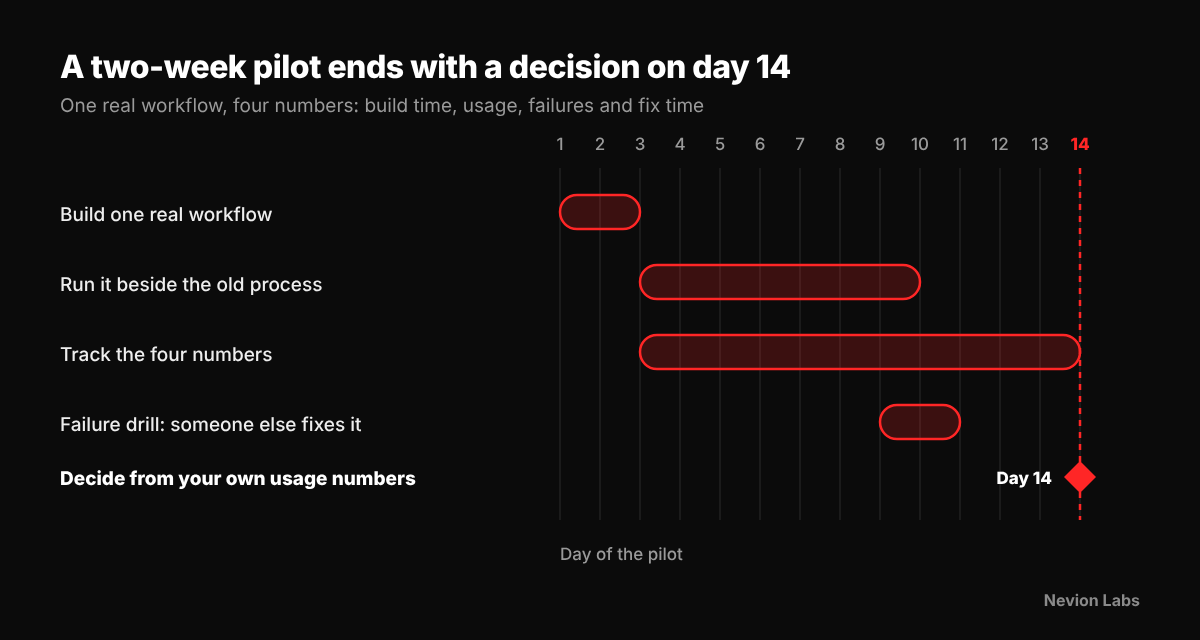
Run a two-week pilot before you pay for a year
Pick one real workflow (lead routing works well), build it on your top choice, and track four numbers:
- Build time
- Monthly usage in the vendor’s own unit
- Failures per hundred runs
- How long it takes someone other than the builder to fix a broken run
Annual plans are cheaper per month but rarely refundable, so don’t commit until those numbers look right.
Switching and lock-in
- No automatic migration. You rebuild the workflows and re-enter the credentials.
- Export: Make and n8n export workflows as JSON, which helps with backups and review. Independent reviews say Zapier has no workflow export.
- Zapier to Make or n8n: workflows of more than three steps usually translate well, since branching and looping are more flexible.
- Cutover: run the old and new versions side by side for a week or two before switching the old one off.
Mistakes to avoid
- Comparing plan prices instead of unit costs. A cheap plan that bills every step can cost more than a pricier plan that bills runs.
- Assuming self-hosted n8n is free. Budget for server time, patching, backups and, if you need SSO, a paid licence.
- Forgetting loops. Row-by-row processing multiplies Make credits and Zapier tasks, so a 500-row import is not one unit.
- Skipping governance early. Decide who owns each workflow, where credentials live and how failures alert someone before you have fifty automations. This is core marketing operations and data work, and it is far cheaper to set up early.
n8n vs Zapier: frequently asked questions
Is n8n better than Zapier?
Only for the right team. n8n wins for engineers who want code, self-hosting and low cost at volume. Zapier wins for non-technical teams that want the widest app library and no servers.
Is n8n or Zapier cheaper?
For long, high-volume workflows, n8n. It bills one execution per run, while Zapier bills every successful action step. For a few short workflows, they cost about the same.
Is n8n really free?
The self-hosted Community Edition has no execution cap, but you pay for the server and the upkeep. SSO needs a paid licence. Cloud starts at about €20 a month.
Are n8n and Zapier the same?
No. Same job, different approach. Zapier is a managed no-code service. n8n is a canvas-plus-code tool you can run on your own servers.
Why is Zapier so expensive?
It bills tasks, meaning every successful action step. A five-step Zap can use five tasks per run. Triggers, filters, paths and Formatter steps are free, so fewer action steps means a smaller bill.
Is Make cheaper than Zapier?
Usually, at moderate volume. Make starts around $9/month for 10,000 credits; Zapier Professional is about $19.99/month for 750 tasks. Loops can still push Make’s usage up.
Where does Make fit?
In the middle. Visual like n8n, no servers like Zapier, and often the cheapest managed option at moderate volume.
Which is better for AI agents?
n8n gives developers the most control, including self-hosted models. Zapier is easier for non-technical teams. Check how each bills AI usage before you scale.
Can I self-host Zapier or Make?
No, both are cloud-only. n8n is the only one you can self-host, and its licence allows internal business use, not reselling.
Is Zapier safe for business data?
Zapier states SOC 2 Type II, SOC 3, GDPR and CCPA compliance; Make states GDPR, SOC 2 Type II and SOC 3. These are vendor claims, so review the current reports yourself.
Is self-hosted n8n safe?
It can be, but you own the patching. It had a CVSS 10.0 vulnerability (CVE-2026-21877), so keep it updated and off the public internet.
Can I migrate later?
Yes, by rebuilding. There is no import between tools, so document your workflows and pilot first.
Bottom line
In the n8n vs Zapier vs Make debate, start with the team, not the tool. Give Zapier to people who need results this week, Make to ops people who think in flowcharts, and n8n to engineers who want control and don’t mind patching what they host. Then run one real workflow for two weeks and let your own usage numbers make the call.
Need help choosing or building this?
Not sure which tool fits your stack? Nevion Labs designs and builds workflow automations for B2B teams.
- Tell us what you want to automate
- We’ll help you pick the right tool and scope a pilot
- We build, document and hand it over with clear ownership
You can also read about our integrations and workflow automation services, see how we have worked with other teams, or get in touch.