
Eight separate verification APIs need to read as one platform, not eight products competing for attention.
Case study · Financial Technology
Meon Technologies.
Turning a complex eKYC API suite into a website enterprise buyers can evaluate.
Meon builds India-focused digital verification and eKYC tools: identity checks, face verification, eSign and a no-code workflow builder, sold mainly to banks, insurers and financial institutions. We built the full product website, covering the product suite, API documentation entry points and industry-specific positioning.
- INDUSTRY
- Financial Technology
- PROJECT TYPE
- SaaS product website
- PLATFORM
- Custom PHP
- YEAR
- 2025
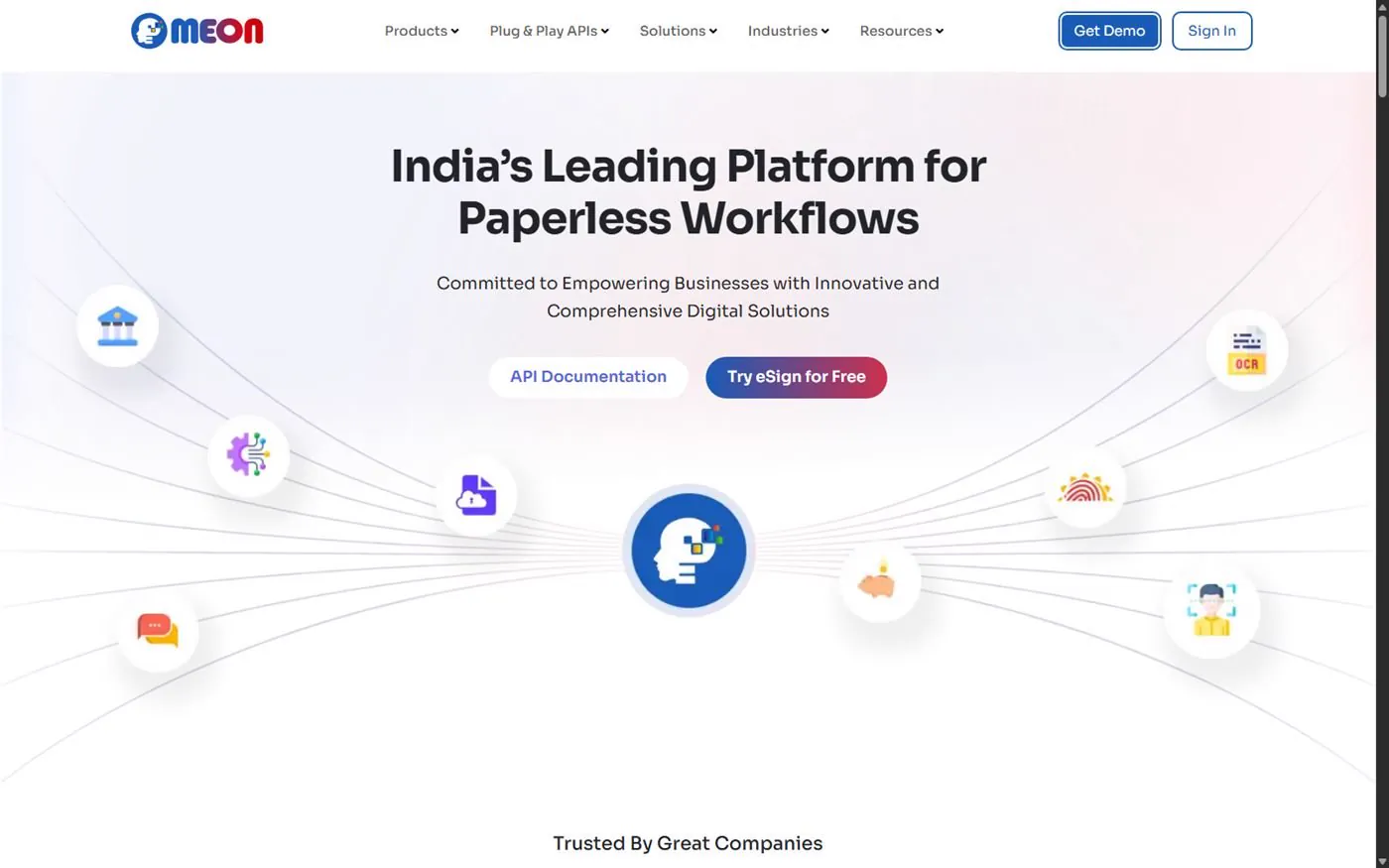
Project highlights
01Eight API products presented as one coherent suite rather than eight disconnected pages.
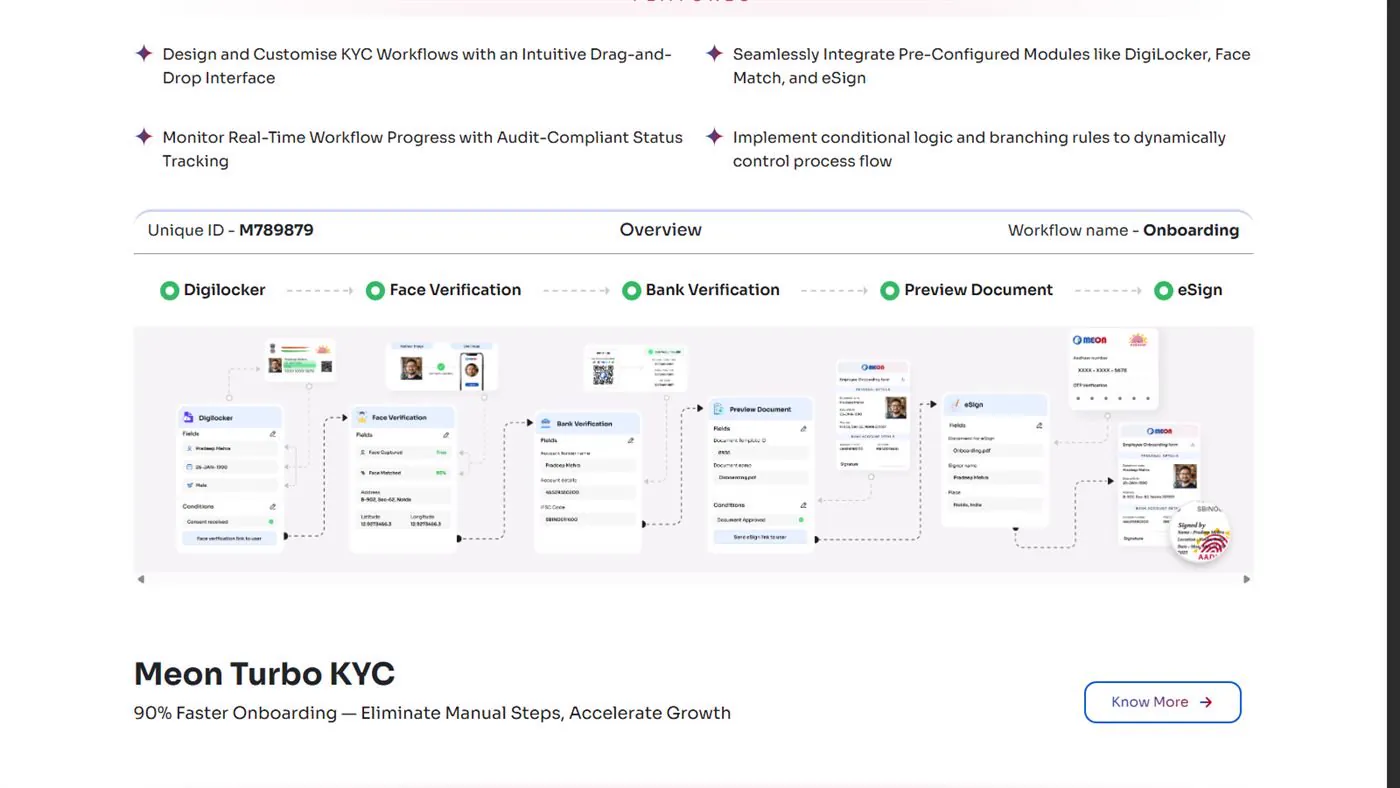
02A visual, step-by-step Workflow Builder (DigiLocker → Face → Bank → Preview → eSign) a non-technical buyer can follow.
03Six industry solution pages so buyers in any regulated sector see their own use case.
04A client-trust section with 25+ recognizable logos, placed high on the homepage.
01 · The challenge
Technical buyers who are also risk-averse.
The no-code Workflow Builder is the main differentiator, but it needs to be shown, not just described.
Buyers from six very different regulated industries need to find their own use case quickly.
Institutional trust signals need to appear early. A buyer who doesn’t trust the vendor won’t evaluate the technology.
02 · Our approach
Four stages, from discovery to launch.
One entry point branching into three audiences: product evaluators, industry buyers and developers.
- 01Discovery
Mapped eight APIs and the Workflow Builder against six target industries.
- 02Information architecture
Products, Plug & Play APIs, Solutions and Industries as parallel paths into one suite.
- 03UI/UX
Designed the Workflow Builder as a visual step-tracker so the concept is shown in the interface.
- 04Development
Custom PHP front end with a structured content model per product and industry.
03 · The solution
Every visitor reaches their situation within two clicks.
The homepage leads with platform positioning, backed immediately by client logos, before any feature detail. Trust comes before technical evaluation.
The Workflow Builder section shows a real example as connected status pills with a document preview, turning “no-code KYC orchestration” into something a buyer can trace.
The eight-product API suite sits in one grid for technical evaluators, while six industry pages give business buyers a parallel path by sector.
04 · Information architecture
Three entry paths into one product suite.
Every journey below is a real path through the live site. Watch how each one reaches its goal.
PRODUCT PATH
Home→Product→Feature detail→Demo request
INDUSTRY PATH
Home→Industry→Relevant product→Demo request
DEVELOPER PATH
Home→Plug & Play APIs→API page→Documentation
05 · Key features
What the site does.
No-code Workflow Builder
DigiLocker, Face Match, Bank Verification and eSign chained in one workflow.
Turbo KYC
Automated onboarding with bulk customer profile upload.
Face Verification
Liveness detection and spoofing-prevention messaging.
eSign
Multi-signer, role-based digital signature flow.
Eight-product API suite
Face, Bank, Aadhaar, Marksheet, OCR, Driver’s License, eNACH and PAN.
Six industry pages
Capital markets, banking, insurance, telecom, healthcare, real estate.
Client trust section
25+ client logos surfaced high on the homepage.
Active blog
Ongoing content on eKYC, eSign and compliance.
06 · Technical implementation
The stack, and why we chose it.
Each line below is a choice we made for this build, and the reason for it.
FRONTENDCustom-built on Bootstrap and jQuery, for full control of each layout.
HOSTINGnginx on Ubuntu, with static assets on a CloudFront CDN.
INDEXABILITYXML sitemap and a curated robots.txt that blocks deprecated pages.
CONTENT MODELOne structured template for every API and industry page.
07 · Outcome
What shipped.
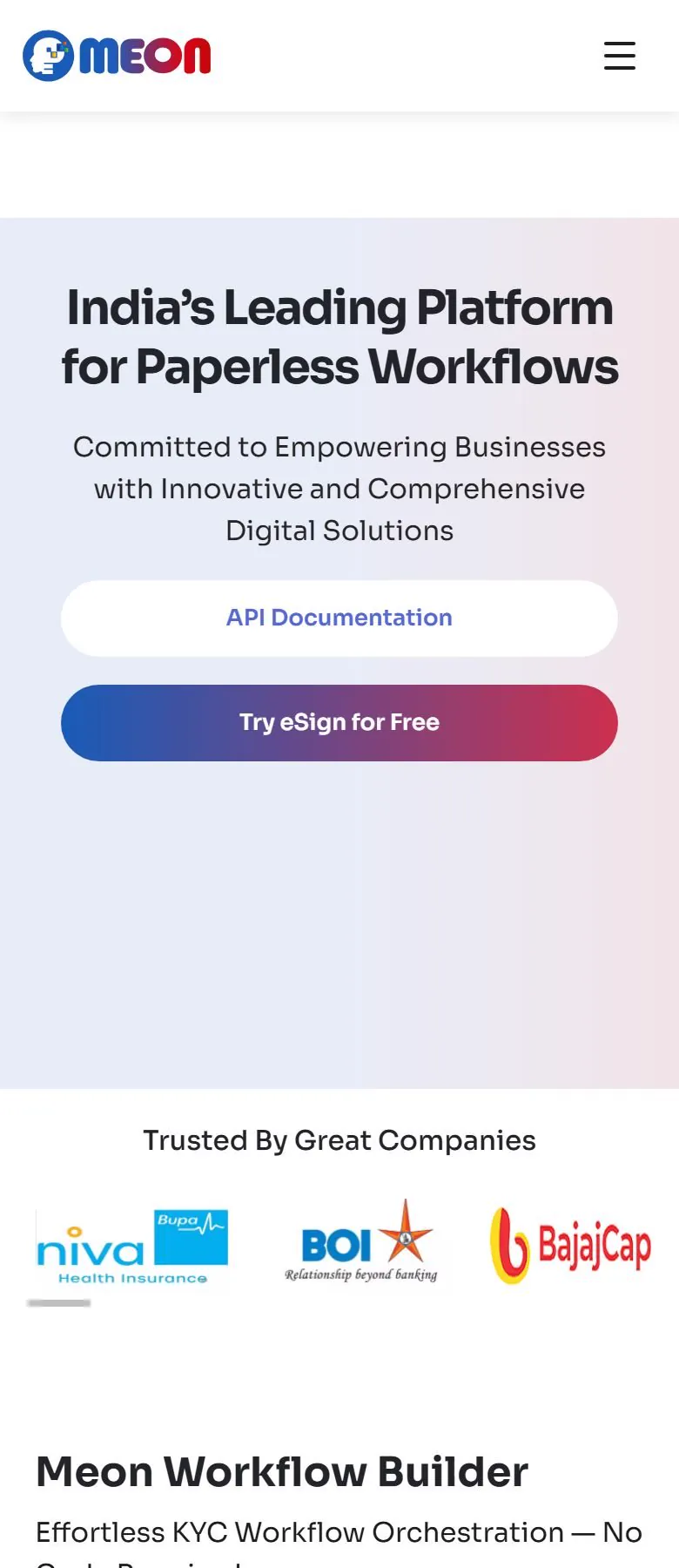
Described as delivered scope, not unverified before-and-after metrics. On mobile: the navigation collapses into a menu, hero CTAs stack full-width, and the client-logo section becomes a swipeable strip.
A unified suite presentation for eight APIs and a no-code Workflow Builder.
Six industry-specific solution pages for regulated sectors.
A trust-first homepage structure matched to how compliance-driven buyers evaluate vendors.
A maintained technical SEO foundation supporting ongoing content growth.
PROJECT SCOPE
Related capability: Conversion-Ready Websites →
RSK Business Solutions →
Working on a similar project
Planning something like this?
A few answers that help most teams decide whether we are the right fit for a similar build.
Still have a question? Ask us →
Frequently asked questions
What does the Meon Technologies website cover?+
It covers Meon’s full eKYC and digital verification suite: eight API products, a no-code Workflow Builder, six industry solution pages and entry points to the API documentation. Meon builds India-focused verification tools such as identity checks, face verification and eSign, sold mainly to banks, insurers and financial institutions. We built the site in custom PHP in 2025.
How does the Meon website explain the no-code Workflow Builder?+
It shows the builder instead of describing it. A visual step tracker walks through a real example, DigiLocker → Face → Bank → Preview → eSign, as connected status pills with a document preview. That turns “no-code KYC orchestration”, Meon’s main differentiator, into a process a non-technical buyer can follow from start to finish.
How are Meon’s eight API products presented as one suite?+
All eight APIs sit together in one grid: Face, Bank, Aadhaar, Marksheet, OCR, Driver’s License, eNACH and PAN. Every API page uses the same structured template, so the products read as one platform rather than eight pages competing for attention. Developers get their own route through Plug & Play APIs to each API page and its documentation.
Which industries does the Meon website have pages for?+
Meon’s website has six industry solution pages: capital markets, banking, insurance, telecom, healthcare and real estate. They give business buyers a path by sector, from industry page to relevant product to demo request, running in parallel with the product grid used by technical evaluators. Each industry page follows the same structured template as the API pages.
How can a B2B website build trust with buyers?+
A B2B website builds trust by being specific: clear explanations of what you do, real product or project details, named people, verifiable proof and easy ways to get in touch. Consistent company details across the site and its structured data help both buyers and search engines. Vague claims and stock superlatives make buyers more doubtful, not less. On Meon, 25+ client logos sit high on the homepage, before any feature detail.
How do you explain an API product to non-technical buyers?+
Explain what the API makes possible in the buyer’s own process, then show it working, and leave endpoints and parameters to the documentation. A visual flow or a short worked example does more than a feature list. Give business buyers and developers separate paths so neither wades through content meant for the other. Meon does this with a visual Workflow Builder section and a dedicated developer path.
Should a SaaS website have separate pages for each industry it serves?+
Yes, if buyers in different industries have different use cases, rules or vocabulary. An industry page lets a buyer see their own situation instead of translating a generic pitch, and it gives search engines a page that matches sector-specific searches. Build them from one template so they stay consistent and easy to maintain, as with Meon’s six industry pages.
How should a SaaS website link to its API documentation?+
Give developers a direct, visible route from the main navigation to API pages and on to the documentation, instead of hiding it in the footer. Each API page should summarize what the API does before handing off to the technical reference. On Meon, a Plug & Play APIs menu leads to each API page and then to its documentation, separate from the product and industry paths.
Where should client logos go on a SaaS homepage?+
Put client logos near the top, right after the main positioning statement and before detailed features. Buyers, especially in regulated or risk-averse sectors, want to know who already trusts a vendor before they spend time evaluating the technology. Meon’s homepage places 25+ client logos directly after its platform positioning, and on mobile they become a swipeable strip so they don’t take over the screen.
Should a SaaS company blog about compliance and regulation?+
Yes, if your buyers need to understand regulations before they buy. Plain-language articles on the rules your product helps with answer the questions buyers search for and give your product pages useful content to link to. Keep them accurate and update them when regulations change. Meon runs an active blog on eKYC, eSign and compliance, backed by a maintained technical SEO foundation.
Have a similar project?
Let's build something that lasts.
Tell us about your project. We'll reply within one business day and send a fixed quote after a short call.